How 3D Scanning Enhances CAD Accuracy in SOLIDWORKS
Discover how 3D scanning technologies enhance CAD accuracy in SOLIDWORKS, improving your design process and quality.
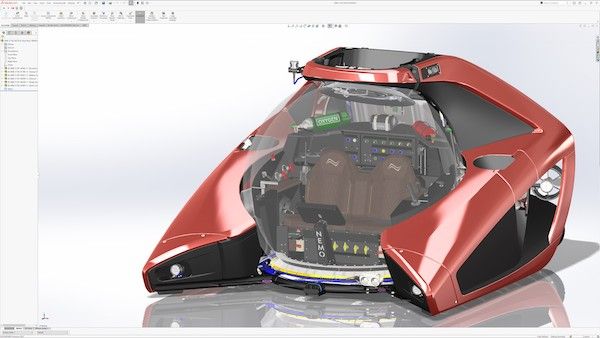
Understanding 3D Scanning in CAD Workflows
3D scanning plays a pivotal role in enhancing the accuracy of CAD models within SOLIDWORKS. By capturing real-world geometries with high precision, 3D scanning provides a foundation for effective reverse engineering and design validation. This process is particularly crucial for companies looking to recreate complex parts or improve existing designs based on physical prototypes.
Technical Concepts in 3D Scanning
To leverage 3D scanning effectively, it's essential to understand various concepts:
- Mesh Data: 3D scans typically generate mesh data, represented as triangulated surfaces or STL files. These files contain a collection of vertices, edges, and faces without any inherent parametric information.
- Surface Models vs. Solid Models: While mesh models are ideal for visualization, they lack the parametric attributes of solid CAD models. In contrast, solid models encompass features like sketches, dimensions, and design intent.
- Parametric CAD Models: CAD models that allow for modifications through parameters and constraints, enabling flexible design iterations.
Workflow for Integrating 3D Scanning with SOLIDWORKS
The process of transforming scanned data into a usable format for SOLIDWORKS involves several key steps:
-
Data Acquisition:
- The 3D scanning process begins with capturing the geometry of the physical object.
- Scanners can vary significantly in accuracy and range, affecting the quality of the resulting mesh.
-
Mesh Inspection and Cleanup:
- After acquisition, the mesh may require inspection for errors such as noise, holes, and anomalies. Tools like MeshLab or Geomagic Design X are utilized for cleaning up the mesh, ensuring high-quality input for subsequent steps.
-
Alignment and Reference Geometry:
- Aligning the scanned mesh with existing CAD data or reference planes is crucial for accurate reconstruction. Proper reference geometry provides a baseline for transforming the mesh into a parametric model.
-
Extraction of Geometric Features:
- Identifying features that can be directly modeled in CAD is essential. This may include extracting curves, surfaces, and other geometric elements needed for the final design.
-
Surface Reconstruction / Flächenrückführung:
- For scanned surfaces, methods of Flächenrückführung become vital. Techniques such as NURBS or B-spline surface fitting are employed to create smooth, editable surfaces from the mesh data.
-
Solid Reconstruction:
- Converting reconstructed surfaces into solid models involves defining the parameters and profile of the new CAD model. SOLIDWORKS provides tools for creating solids based on extracted features and parameterization.
-
Validation and Deviation Analysis:
- Once the model is created, dimensional validation against the original component is essential. Tools within SOLIDWORKS allow engineers to perform deviation analysis to compare the scanned geometry with the CAD model.
Limitations and Challenges
While 3D scanning significantly aids in CAD accuracy, challenges remain:
- Quality of the Mesh: The resulting mesh quality directly affects the ease of mesh processing and the accuracy of feature extraction. Poorly scanned surfaces may lead to complex reconstruction challenges.
- Geometry Complexity: Complex geometries, especially those with organic shapes, may not convert easily into solid models without extensive manual intervention.
Practical Applications
The integration of 3D scanning into CAD workflows, particularly in SOLIDWORKS, serves various practical applications:
- Legacy Part Reconstruction: For companies working with outdated or lost CAD data, 3D scanning helps recreate essential components.
- Quality Control: 3D scanning provides a mechanism for validating manufactured parts against design specifications, enhancing quality assurance practices.
- Prototyping and Design Improvement: Utilizing scanned data enables iterative design processes where engineers adjust and improve existing products based on real-world performance.
The combination of 3D scanning with SOLIDWORKS presents significant advantages in terms of accuracy and efficiency in CAD workflows. By understanding the technical aspects and workflows involved, engineers and designers can enhance their capabilities in reverse engineering and product development, leading to better outcomes in industrial design and manufacturing practices.
For more insights into integrating these technologies into your projects, contact us to discuss how we can assist your engineering needs.